
11直播模式下伴奏与人声升降调操作
var player=cyberplayer("playercontainer").setup({width:650,height:400,autostart:true,stretching:"uniform",volume:100,controls:true,playlist:[{sources:[{file:'https://cloud.vide...

本站作者Studio 共计发布文章52篇
var player=cyberplayer("playercontainer").setup({width:650,height:400,autostart:true,stretching:"uniform",volume:100,controls:true,playlist:[{sources:[{file:'https://cloud.vide...
var player=cyberplayer("playercontainer").setup({width:650,height:400,autostart:true,stretching:"uniform",volume:100,controls:true,playlist:[{sources:[{file:'https://cloud.vide...
var player=cyberplayer("playercontainer").setup({width:650,height:400,autostart:true,stretching:"uniform",volume:100,controls:true,playlist:[{sources:[{file:'https://cloud.vide...
var player=cyberplayer("playercontainer").setup({width:650,height:400,autostart:true,stretching:"uniform",volume:100,controls:true,playlist:[{sources:[{file:'https://cloud.vide...
var player=cyberplayer("playercontainer").setup({width:650,height:400,autostart:true,stretching:"uniform",volume:100,controls:true,playlist:[{sources:[{file:'https://cloud.vide...
var player=cyberplayer("playercontainer").setup({width:650,height:400,autostart:true,stretching:"uniform",volume:100,controls:true,playlist:[{sources:[{file:'https://cloud.vide...
var player=cyberplayer("playercontainer").setup({width:650,height:400,autostart:true,stretching:"uniform",volume:100,controls:true,playlist:[{sources:[{file:'https://cloud.vide...
var player=cyberplayer("playercontainer").setup({width:650,height:400,autostart:true,stretching:"uniform",volume:100,controls:true,playlist:[{sources:[{file:'https://cloud.vide...
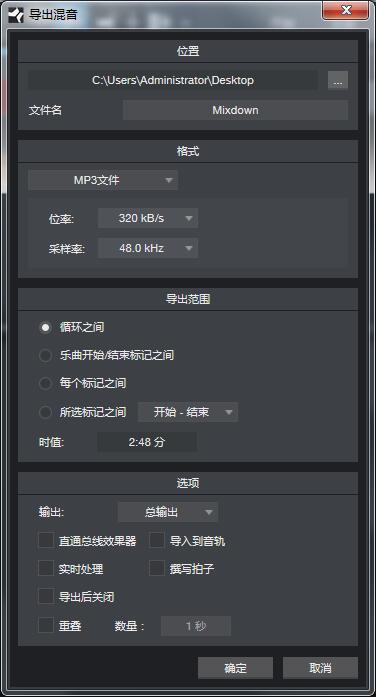
首先我们打开软件,选择新建乐曲或者是直接打开一个乐曲文件,,之后点击上方工具栏的“乐曲”选项,接着选择“混缩为音频文件”,注意,导出不是在第三个“导出符尾”里。 打开“混缩为音频文件”窗口 这时会跳出一个混缩为音频文件的窗口,我们可以发现这个窗口里的选项还是挺多的,最上方“位置”菜单可以设置您要导出音频的名称、位置和是否上传。 ...
有事请打我电话13738373177
在线咨询:
QQ136677098
QQ328493711

最新评论
这是一个伟大的网站
感觉还行
安装包呢,下载地址?、
感觉有点难搞
软件使用都需要功夫,要反复试用、探索才行...
插件需要认真操作、学习!